What are we making?
Here's the finished game. Left: playing. Right: with the cheat sheet open.
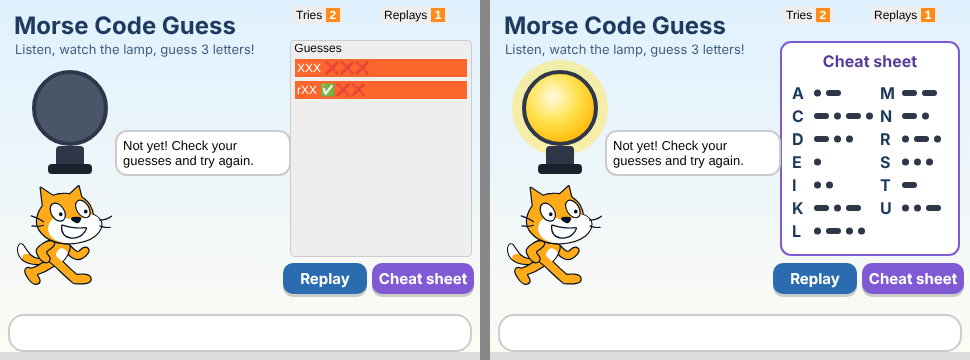
- The game picks 3 secret letters.
- The lamp flashes and beeps them in Morse code.
- You type your guess. Every guess goes in the Guesses list with ✅ (right letter, right place) or ❌ (wrong).
- Keep guessing until all three are ✅. Click Replay to hear them again, or Cheat sheet to peek at the codes.
- When you win, the cat tells you your score: how many tries and replays you used.
Morse code in 1 minute
Morse code turns every letter into short and long beeps.
- Dot = a short beep (in our game: 0.1 second).
- Dash = a long beep, 3 times as long as a dot (0.3 second).
- Between dots and dashes inside a letter: a tiny silence (1 dot long).
- Between letters: a longer silence. Real Morse uses 3 dots; we use 1 second so it's easier to hear.
Our 13 letters, click one to hear it 🔊
Your school exercise is to spell SD ISLAMIC CENTER SAMARINDA KALIMANTAN TIMUR. Those words use only these 13 letters, so the game uses only these too.
1Get the files
Open Scratch (online or the Scratch app) and start a new project. Then download these files:
 backdrop.svgStage backdrop
 lamp-off.svgLamp costume “off”
 lamp-on.svgLamp costume “on”
 replay-button.svgReplay Button
 cheat-button.svgCheat Button
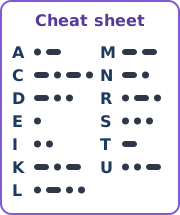 cheat-sheet.svgCheat Sheet
🔈1-dot.mp3Dot sound (0.1 s)
🔊2-line.mp3Dash sound (0.3 s)
🔤letters.txtFor the Letters list
·–codes.txtFor the Codes list
2Make the sprites
We need 5 sprites and a backdrop. Names matter! Type them exactly like this, because the code uses them.
| Sprite name | Costumes | Sounds | x | y | Visible? |
|---|---|---|---|---|---|
| Host (rename “Sprite1”, the cat) | keep the cat | — | -175 | -55 | yes |
| Lamp | off (lamp-off.svg)on (lamp-on.svg) | 1-dot2-line | -170 | 72 | yes |
| Replay Button | replay-button.svg | — | 85 | -100 | yes |
| Cheat Button | cheat-button.svg | — | 183 | -100 | yes |
| Cheat Sheet | cheat-sheet.svg | — | 140 | 32 | no (click the 👁 “hide” icon) |
- Click the cat sprite and change its name from
Sprite1toHost. - Upload lamp-off.svg as a new sprite and name it
Lamp. In its Costumes tab, upload lamp-on.svg too. Rename the costumes tooffandon. - Still on the Lamp, open the Sounds tab and upload 1-dot.mp3 and 2-line.mp3. Delete the default sound if there is one.
- Upload the two buttons and the cheat sheet, and name them as in the table.
- Type the x and y numbers into the boxes under the stage for each sprite.
- Click the Stage (bottom right), open Backdrops, upload backdrop.svg, and delete the white “backdrop1”.
3Variables & lists
Go to the orange Variables category. Use Make a Variable and Make a List.
For all sprites
Any sprite can use these, so pick “For all sprites” when you make them.
| Name | Kind | What it's for |
|---|---|---|
Secret | variable | The 3 secret letters, like SAM |
Tries | variable | How many guesses you made |
Replays | variable | How many times you clicked Replay |
Solved | variable | 1 when you guessed right, else 0 |
Playing | variable | 1 while the lamp is beeping |
Letters | list | The 13 letters |
Codes | list | The Morse code of each letter |
Guesses | list | Your guesses with ✅ / ❌ |
For this sprite only
First click the sprite, then make the variable with “For this sprite only”.
| Sprite | Variables |
|---|---|
| Host | Guess Feedback Question i |
| Lamp | letter # symbol # letter gap |
| Cheat Sheet | showing |
Fill the two lists
- Make sure the checkbox next to
Lettersis ticked, so the list shows on the stage. - Right-click the list on the stage → import → choose letters.txt.
- Do the same for
Codeswith codes.txt. - Check: item 1 of Letters is
Aand item 1 of Codes is.-. Item 11 isSand...
Letters (S) matches the code in place 11 of Codes (...). To find a code, we ask “where is S in Letters?”, then take the item in that same place from Codes.
| # | 1 | 2 | 3 | 4 | 5 | 6 | 7 | 8 | 9 | 10 | 11 | 12 | 13 |
|---|---|---|---|---|---|---|---|---|---|---|---|---|---|
| Letters | A | C | D | E | I | K | L | M | N | R | S | T | U |
| Codes | .- | -.-. | -.. | . | .. | -.- | .-.. | -- | -. | .-. | ... | - | ..- |
What shows on the stage
Keep only Tries, Replays and Guesses ticked. Drag Tries and Replays to the top-right corner, and drag and resize the Guesses list to fill the right side (above the buttons). Untick Secret, or the answer shows on screen! 😄
4Lamp: the “play code” block
Our own block that plays one Morse code, like -.-.
- Click the Lamp sprite. Go to My Blocks → Make a Block.
- Type
play code, then click Add an input (number or text) and name itcode. - Leave “Run without screen refresh” unticked and click OK.
- Build this under the pink define block. Drag the
codeinput from the define block when you need it.
define play code (code)
set [symbol # v] to (1)
repeat (length of (code))
  switch costume to (on v)
  if <(letter (symbol #) of (code)) = [.]> then
    play sound (1-dot v) until done
  else
    play sound (2-line v) until done
  end
  switch costume to (off v)
  wait (0.1) seconds
  change [symbol # v] by (1)
end
How does it work?
symbol # is our pointer. It starts at 1 and moves one step each time round the loop. Here's what happens for the letter C (-.-.):
| Round | symbol # | letter (symbol #) of code | What we hear |
|---|---|---|---|
| 1 | 1 | - | long beep (lamp on 0.3 s) |
| 2 | 2 | . | short beep (lamp on 0.1 s) |
| 3 | 3 | - | long beep |
| 4 | 4 | . | short beep |
5Lamp: play all 3 letters
Still on the Lamp. First the start-up script:
when green flag clicked
switch costume to (off v)
set [Playing v] to (0)
set [letter gap v] to (1)
Now the script that plays the secret. In the when I receive dropdown, choose New message and call it play letters.
when I receive [play letters v]
set [Playing v] to (1)
set [letter # v] to (1)
repeat (length of (Secret))
  play code (item (item # of (letter (letter #) of (Secret)) in [Letters v]) of [Codes v]) :: custom
  wait (letter gap) seconds
  change [letter # v] by (1)
end
set [Playing v] to (0)
SAM and letter # is 1:letter (1) of SAM → S → item # of S in Letters → 11 → item 11 of Codes → ... → play code ...
🧪 Test the lamp now!
Add this test script to the Lamp, then press space. You should hear and see ... .- -- (S A M).
when [space v] key pressed
set [Secret v] to [SAM]
broadcast (play letters v)
Works? Great, now delete the test script.
6Cat: the “make feedback” block
Click the Host (cat). Make a new block called make feedback with no inputs.
define make feedback
set [Feedback v] to []
set [i v] to (1)
repeat (3)
  if <(letter (i) of (Guess)) = (letter (i) of (Secret))> then
    set [Feedback v] to (join (Feedback) [✅])
  else
    set [Feedback v] to (join (Feedback) [❌])
  end
  change [i v] by (1)
end
It compares the guess and the secret letter by letter. Secret SAM, guess SAT → ✅✅❌.
Y and N.
7Cat: the game loop
The biggest script! It goes on the Host too. Take your time.
when green flag clicked
show list [Guesses v]
forever
  set [Secret v] to []
  repeat (3)
    set [Secret v] to (join (Secret) (item (pick random (1) to (length of [Letters v])) of [Letters v]))
  end
  set [Tries v] to (0)
  set [Replays v] to (0)
  set [Solved v] to (0)
  delete all of [Guesses v]
  say [Listen carefully...]
  wait (0.5) seconds
  broadcast (play letters v) and wait
  say []
  set [Question v] to [Which 3 letters did you hear?]
  repeat until <(Solved) = (1)>
    ask (Question) and wait
    set [Guess v] to (answer)
    if <(length of (Guess)) = (3)> then
      change [Tries v] by (1)
      make feedback :: custom
      add (join (Guess) (join [   ] (Feedback))) to [Guesses v]
      if <(Guess) = (Secret)> then
        set [Solved v] to (1)
      else
        set [Question v] to [Not yet! Check your guesses and try again.]
      end
    else
      set [Question v] to [Please type exactly 3 letters.]
    end
  end
  say (join [Correct! It was ] (join (Secret) (join [. Tries: ] (join (Tries) (join [, replays: ] (Replays)))))) for (4) seconds
  ask [Press Enter for a new round.] and wait
end
In the add … to Guesses block, the empty-looking box in the middle has 3 spaces typed in it, so the guess and the ✅❌ don't stick together.
The 3 parts of the loop
- New round. Start with an empty
Secret. Three times, add a random letter fromLetters. Reset the score, clear the Guesses list, and tell the Lamp to play (broadcast and wait waits until the lamp is finished). - Guessing. Ask again and again until Solved = 1. Only 3-letter answers count as a try. Each try is added to the list with its feedback.
- You win! Show the score, then wait for Enter. The forever loop goes back to the top for a new round.
= doesn't care about big or small letters, so sam = SAM is true. Players can type in lowercase!
9Play-test checklist
Click the green flag and try each of these. Tick them off as you go.
Something wrong?
The lamp doesn't light up
Check the Lamp's costume names are exactly off and on (small letters).
No sound
Check the Lamp's sound names are 1-dot and 2-line, and the blocks in play code pick the right one: dot for ., dash for anything else.
The beeps are the wrong letter
The two lists must be in the same order. Compare them with the table in Step 3.
Nothing plays at all
Check the message name is exactly play letters in both the broadcast and the when I receive blocks.
My right guess is never “Correct”
Make sure Guess is set to answer (light blue Sensing block), and that Secret is a “For all sprites” variable.
Challenges 🚀
Finished? Try making your game even better.
- Get faster: change
letter gapfrom 1 to 0.5, then 0.3 (real Morse speed!). - All 26 letters: add the missing letters to
Lettersand their codes toCodes. Keep the same order in both! Don't forget to update the cheat sheet. - Victory sound: play a happy sound when you guess right.
- Total score: add a
Rounds wonvariable that counts how many rounds you've finished. - 4 letters: change all the 3s to 4. Which blocks need to change? (Hint: there are three of them.)
- Your name: make the secret your own name instead of random letters.